


What Is Multimeter And How To Use It:
There are different parts of a multimeter. So we will know what is multimeter in laptop repairing below:
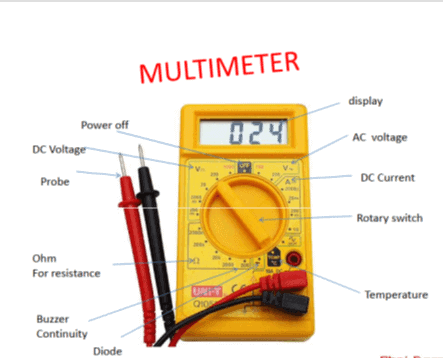
1. Power Off :
This is used to turn the multimeter off.
2. DC Voltage :
This is used to set multimeter on DC range. This is helpful to measure DC supply on a multimeter.
3. Probe :
Probes are used to count the voltage supplies. Voltage supplies can be of two types AC voltage or DC voltage. We can measure both types of ac or dc type of voltages using a multimeter.
Just we have to turn on the rotational switch top appropriate location. It can also calculate the beep range and cold testing in laptop reparing.
4. Ohm for resistance :
Ohm is the unit of resistance. We can use the rotary switch in the ohm range. This range measures active available Ohm supply.
5. Buzzer Continuity :
The buzzer is the indicator on the multimeter which can be turned on by the multimeter. The main purpose of the buzzer is to check continuity via probs.
5. Diode :
The diode range is available on a multimeter. It is used to check any available diode for its value. It can be measured by probes.
6. Temperature :
Temperature can also measure on some multimeters. This feature is if available you can see the temperature symbol on the multimeter which can be targeted via a rotary knob.
7. Rotary Switch :
The main purpose of the rotary switch is to make it unable to measure all things on a multimeter. If we want to measure any range of supply or turn of the multimeter we can use the Rotary switch.
8. DC Current :
The DC current can be measured on a multimeter via the DC range. We have to put one probe on the ground and another probe on the element we want to measure.
9. Display :
The display is used to get information about the current value of the multimeter. The current can display ac range, dc range, ohm range, buzzer.
You can also check our other laptop preparing help guides.
thank you for your visit…